
Saved analyses keep your Oracle Fusion query and its setup together
Short answer: A Data Collage saved analysis stores SQL, formula columns, formats, hidden columns, column order, and bind defaults in a portable .dcanalysis file. Reopen it for your next run or share it with a colleague. Query history helps you recover recent work, and snippets help you write it again.
A useful month-end query is rarely just a SELECT. You may add an amount-due formula, hide technical IDs, arrange the columns, and choose date and currency formats. Rebuilding those details each month takes time and makes handoffs harder.
Saved analyses keep that setup with the query, so the next run starts from a prepared workspace.
What does a saved analysis contain?
- SQL text: the query in the editor.
- Formula columns: their names and expressions.
- Column formats: applied date, number, and currency formats.
- Hidden columns and column order: the presentation you chose.
- Bind defaults: the inputs you last supplied for the query.
The file does not contain the result set or the active Fusion connection. Reopen it, check the inputs and connection, then run it to fetch current data.
How do I save and reopen an analysis?
Choose File → Save as Analysis… to create the first file. Give it a meaningful name, module, description, and tags. After making changes to an existing analysis, use Save Analysis.
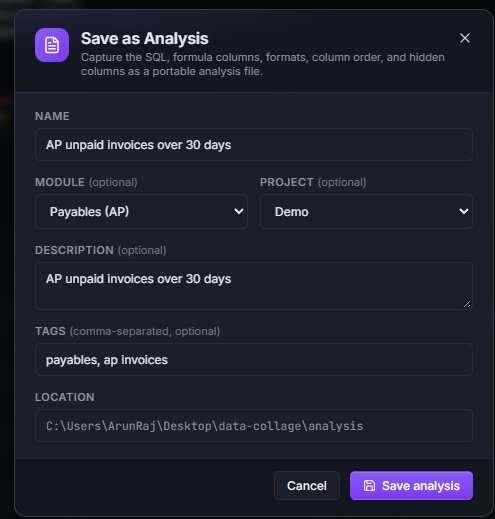
The Analyses panel groups saved work by module and lets you search names, descriptions, and tags. Use Open in new tab to keep your current work in place while opening another analysis.
If you close an analysis with unsaved changes, the app prompts you to save or discard them. Keep an original and create a variant with Save as Analysis… when the new question needs a different query.
Example: prepare an unpaid-invoice review for the next close
Start with a query that returns the fields your review needs:
--@title: AP unpaid invoices over 30 days
--@hide: INVOICE_ID
--@format: INVOICE_AMOUNT = number(2dp), INVOICE_DATE = date(DD-MMM-YYYY)
SELECT ai.invoice_id            AS INVOICE_ID,
       ai.invoice_num           AS INVOICE_NUM,
       ai.invoice_date          AS INVOICE_DATE,
       ai.invoice_currency_code AS CURRENCY_CODE,
       ai.invoice_amount        AS INVOICE_AMOUNT,
       ai.amount_paid           AS AMOUNT_PAID
FROM   ap_invoices_all ai
WHERE  ai.payment_status_flag <> 'Y'
AND    ai.cancelled_date IS NULL
AND    ai.invoice_currency_code = :p_currency
AND    ai.invoice_date < TRUNC(SYSDATE) - 30
ORDER  BY ai.invoice_date
Add an AMOUNT_DUE formula using INVOICE_AMOUNT - NVL(AMOUNT_PAID, 0). Run with the currency you need, arrange the columns, then save the tab as an AP analysis tagged month-end.
At the next close, reopen it and review the prefilled inputs. The SQL, formula, and presentation are ready; Run fetches a new result. This example reviews invoices by age and payment status, so adapt it to the precise accounting question and reporting-security rules your team uses.
Share the analysis across people and environments
A .dcanalysis file is an ordinary local file. Share it through your team’s usual file-sharing process, put it on a shared drive, or retain it in a repository. A colleague opens it through Data Collage’s Analyses panel or Ctrl+O.
Because the file does not carry a connection, it can be reused against PROD, UAT, or SIT. A pinned default connection is used when opening it; without one, select a connection before running.
Each person authenticates with their own Fusion identity. Review the environment tag and bind defaults before execution, and retain any secured views or security filters the query requires.
Recover the query you did not save
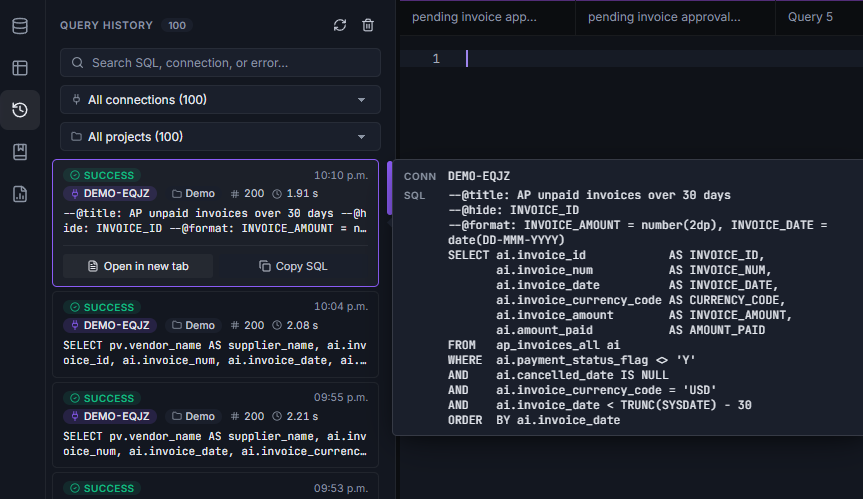
Query History retains the 100 most recent runs locally, including SQL, connection, timestamp, elapsed time, status, row count, and error messages. Search by table name, environment, or an error such as ORA-00942.
Use Open in new tab to recover a query or Copy SQL to reuse it. Older entries roll off as new ones are added, so save important work as an analysis or SQL file.
Choose the right form of reuse
Use a .sql file for plain-text query sharing and code review. Use .dcanalysis when formulas and workspace setup matter too. Short codes reuse small SQL fragments; the bundled Query Library supplies searchable starter queries.
Frequently asked questions
Does a saved analysis include the returned data?
No. It stores the query and its setup. Run it again to retrieve data from the selected Fusion environment.
Can my team share Oracle Fusion analyses?
Yes. Share the file, then open it in Data Collage and select the appropriate connection and inputs.
Will an analysis remember my previous bind values?
Yes. Saved bind defaults prefill the dialog. You can change them before running.
Is query history shared between computers?
No. History is stored locally on each machine and keeps the 100 most recent runs.
Related features
- SQL directives — keep presentation instructions in plain-text SQL.
- Results grid — build the formulas and layout you want to reuse.
- Secure connections — manage the environments where analyses run.
Want to make your team’s Fusion analyses easier to reuse? Get in touch with Newarc Consulting to discuss your requirements and how to get started.