
From your first query
to a reusable analysis.
Explore the tools that help you investigate Oracle Fusion data, work with results, and revisit your analysis—all in one desktop workbench.
Find the answers behind your Fusion data.
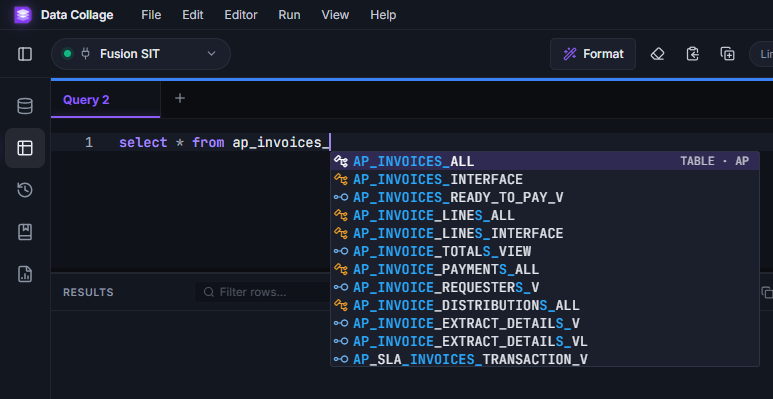
Write read-only SQL with tools that help you find tables, check functions, and keep your work organized.
- Find tables and columns with metadata-aware autocomplete.
- Reuse snippets and change query inputs with bind parameters.
- Keep separate queries and their results in individual tabs.
Make complex results easier to understand.
Focus on the rows that matter, calculate additional values, and present results in a format your team can use.
- Sort and filter results, then hide columns you do not need.
- Add formula columns that build on your query results and other formulas.
- Apply number and date formats, or save query results to CSV or Excel.
Go from a result to the record in Fusion.
Follow supported records from your results into Oracle Fusion to continue your investigation in context.
- Choose a supported entity, such as an AP invoice or purchase order.
- Map the required identifiers from your result columns.
- Make a column clickable and open records using your Fusion browser session.
Build an analysis once. Use it again.
Keep the query and its presentation together, so recurring work starts with an analysis you have already prepared.
- Save SQL, formula columns, formats, and bind defaults in one analysis file.
- Find saved analyses by name or module and reopen them in a new tab.
- Share an analysis file with a teammate to run against their own configured connection.
Keep your Fusion environments organized.
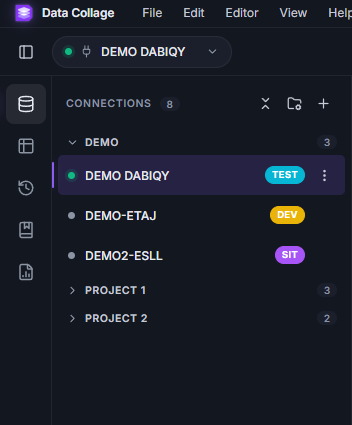
Save your environments in one place and use clear labels to identify the connection you are working with.
- Label connections for production, testing, development, or your own environment names.
- Connect with your Fusion credentials or your organization’s SSO flow.
- Test the connection before saving it. BI Publisher upload and run permissions are required.
Built around Fusion’s reporting layer.
Data Collage uses Oracle Fusion’s BI Publisher reporting layer and validates SQL locally before running read-only queries.
The details are there when you need them.
Take a closer look at each feature.
Practical examples, setup details, and answers to common questions about Data Collage.
Connect to Oracle Fusion securely with your own Fusion identity
Run SQL in Oracle Fusion with Data Collage using Basic auth or Fusion SSO. Connect through BI Publisher without database credentials.
Read the guide → Oracle FusionA SQL editor built for Oracle Fusion
Write Oracle Fusion SQL with table and column autocomplete, bind parameters, reusable snippets, and formatting in Data Collage.
Read the guide → Oracle FusionRead-only SQL enforced before your query leaves your machine
Data Collage validates SQL locally and blocks INSERT, UPDATE, DELETE, and DDL before sending queries to Oracle Fusion through BI Publisher.
Read the guide → Oracle FusionInvestigate Oracle Fusion results in a grid built for analysis
Filter and format Oracle Fusion query results, add numeric formula columns, find duplicates, and export to Excel, CSV, JSON, or HDL.
Read the guide → Oracle FusionOpen Oracle Fusion records straight from your query results
Open supported Oracle Fusion records from Data Collage query results. Map record IDs, create clickable columns, and investigate in your browser.
Read the guide → Oracle FusionSaved analyses keep your Oracle Fusion query and its setup together
Save Fusion SQL, formulas, formats, and bind defaults in portable analyses. Share queries with your team and recover past runs from local history.
Read the guide → Oracle FusionSQL directives keep your result layout with your Oracle Fusion query
Use SQL comment directives to name tabs, show or hide columns, reorder results, and format numbers, currencies, and dates in Data Collage.
Read the guide → Coming soon · Oracle EPMComing soon: Oracle Fusion and Oracle EPM in one app
Oracle EPM support is planned for Data Collage in early 2027. Prepare reusable Fusion analyses now and get in touch for release updates.
Read the guide →Bring your next Fusion question.
Every license starts with a free 14-day trial. Individual and Team licenses include the same product features.